本文档介绍了Glorp对象关系映射器。通过阅读本文档,您将学习如何将对象映射到关系型数据库。本教程逐步展示了Glorp的使用方法,涵盖基础与高级概念。文档末尾附有回顾关系型数据库概念的附录。感谢此前Glorp教程的作者R. Withney与N. Pratt允许我们使用其部分材料。本文档由E. Maringolo撰写,S. Ducasse编辑。
Glorp 是什么?
在Pharo这样的动态对象环境中工作非常便利。您可以自由创建领域对象并按需组合它们。虽然某些情况下这些对象能够保持原有设计结构进行存储,但有时您不得不将对象存储于关系数据库管理系统(即RDBMS)中。这就需要将对象图扁平化,转存为由RDBMS管理的关系数据表。
这种将对象映射到数据表的过程称为对象关系映射(ORM)。为了支持将对象模型持久化存储到数据表中,ORM会对对象模型的设计施加某些约束。某些模型较容易映射到数据表,而难点在于所谓的对象关系阻抗失配问题。
为操作关系型数据库,Pharo提供了一款久经考验的ORM工具——Glorp(通用轻量级对象关系持久化框架)。该工具十年前诞生于CampSmalltalk,并持续维护至今。它通常以全大写缩写"GLORP"或专有名词"Glorp"两种形式被称呼。
作为功能完备的ORM框架,Glorp提供诸多特性以最大限度降低阻抗失配。这些特性包括:免去手动编写SQL查询语句、通过事务管理实现镜像内对象变更的回滚或数据库提交、使用纯Pharo语法编写简单及复杂查询等。本章入门篇及后续高级主题章节将详细讲解这些功能。
安装
数据库服务器
在安装Glorp之前,请确保您已在本地计算机或可访问的服务器上安装了所选的关系数据库管理系统(RDBMS),可以是PostgreSQL(http://postgresql.org)、MySQL(http://dev.mysql.com/)、SQLite(http://sqlite.org)或任何其他您偏好的数据库(只要受支持)。下文中我们将您选择的这个RDBMS统称为“平台”。
数据库驱动
请确保已在Pharo镜像中安装连接数据库服务器所需的驱动程序。
原生驱动
原生驱动程序的底层协议采用Smalltalk编写,通过Pharo套接字进行有线数据传输。这种方式的优势在于自成体系,无需依赖外部文件或配置即可连接服务器。同时,由于所有代码均使用Smalltalk编写,开发者能够运用Pharo调试工具进行直至底层协议的全面调试。
库封装的驱动程序(FFI)
库封装驱动程序,顾名思义,是对操作系统底层共享库(如.dll或.so文件)的封装。这类封装器通过外部函数接口(FFI)调用及数据结构来访问共享库函数。
使用外部库的优势在于:对于Oracle等私有协议,可直接使用官方的客户端实现;即使面对开放协议规范,也能确保采用官方版本。若要在Pharo中使用此类驱动,需实现相应的封装类与方法。
通用驱动API
尽管Pharo提供了多种数据库驱动,但这些驱动采用不同的应用程序接口(API),导致无法直接互换使用。这使得在不同驱动间迁移或同时支持多种关系数据库管理系统变得困难。
为解决此问题,Garage(即Garage驱动)应运而生。它为不同的驱动实现提供了统一的API接口,堪称Pharo领域的ODBC、JDBC或ADO.NET驱动标准。
通过采用这套通用API,当您从MySQL迁移至PostgreSQL时(只要不使用特定数据库的专属功能),代码就无需修改——因为所有已实现的驱动都将遵循Garage通用接口规范。
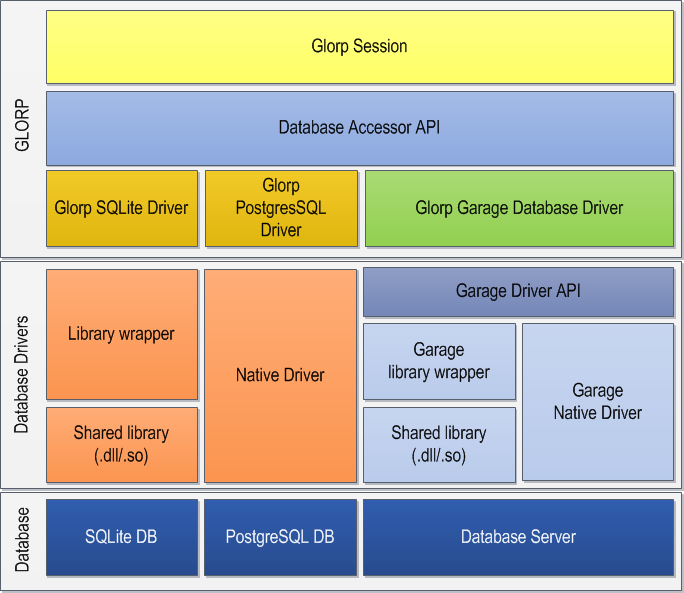
可用驱动
目前不同版本的Pharo提供了多种数据库驱动。截至本文撰写时,主要支持的驱动包括:
- P3(原生PostgreSQL v3协议驱动)
- Garage系列
- PostgreSQL原生驱动
- MySQL原生驱动
- UDBC SQLite3驱动
Glorp搭配P3
P3是一款专为Pharo打造的现代化、轻量级PostgreSQL客户端。
P3Client采用前后端3.0协议(支持PostgreSQL 7.4版本[2003年]及后续版本),实现了简易查询循环。该驱动支持明文及MD5密码认证机制,能高效地将返回的行数据转换为对象,并兼容大多数常见PostgreSQL数据类型。
更多详细信息可查阅其代码仓库。如需加载该驱动,请首先通过Metacello完成安装。
Metacello new
   baseline: 'P3';
   repository: 'github://svenvc/P3';
   load: 'glorp'.
Glorp的Garage兼容包
Glorp提供了配置完善的Metacello方案,可选择性加载核心类文件及测试模块。
Metacello new
	smalltalkhubUser: 'DBXTalk' project: 'Garage';
	configuration: 'GarageGlorp';
	version: #stable;
	load.
若需加载Alpha版本的Garage,应当获取最新版本而非稳定版(因为稳定版可能不适用于Alpha流)。
其中包含Glorp-Core核心功能包以及Glorp-Tests测试包。
Glorp 搭配 UDBC/SQLite3
Glorp也可配置为在Pharo 5中直接使用UDBC SQLite3驱动(替代Garage驱动):
Gofer it
	smalltalkhubUser: 'TorstenBergmann' project: 'UDBC';
	configuration;
	load.
	(Smalltalk at: #ConfigurationOfUDBC) loadBleedingEdge.
Gofer it
	smalltalkhubUser: 'DBXTalk' project: 'Garage';
	configurationOf: 'GarageGlorp';
	load.
	(Smalltalk at: #ConfigurationOfGarageGlorp) project stableVersion load.
Gofer it
	smalltalkhubUser: 'DBXTalk' project: 'Glorp';
	package: 'Glorp-SQLite3';
	load.

	GlorpSQLite3CIConfiguration new configureSqlite3.
	GlorpDemoTablePopulatorResource invalidateSetup.
运行测试
加载数据库驱动及Glorp软件包后,建议运行Glorp的单元测试,以确保所有组件正确加载且运行正常。
我们的第一个示例类:Person
为将前述概念投入实践,我们将在Pharo环境中创建Person类,并将其存储至PERSON数据库表中。
类定义
Object subclass: #Person
	instanceVariableNames: 'id firstName lastName birthDate'
	classVariableNames: ''
	package: 'Glorp-Book'
实例方法
Person >> firstName: aString
	firstName := aString

Person >> firstName
	^ firstName

Person >> lastName: aString
	lastName := aString

Person >> lastName
	^lastName

Person >> birthDate: aDate
	birthDate := aDate

Person >> birthDate
	^birthDate

Person >> initialize
	super initialize.
	birthDate := '1/1/1970' asDate
定义描述系统
如您所见,上述创建的类和方法不包含任何与持久化相关的代码,也无需继承特定基类。
Glorp将所有相关概念(如表、列、类等)建模为一等对象,随后通过描述符系统将这些对象实例相互关联。描述符系统作为Glorp框架的核心,承载着所有元数据,包括数据表、描述符和类模型等信息。
通过使用独立的构件(本例中为一个类)来定义系统的所有元数据,您可以将业务模型与其持久化信息解耦。这种关注点分离是良好的编程实践,有助于提升代码的可维护性。
此外,采用正交方式描述领域对象允许您为同一业务领域类创建多个描述符。这与ActiveRecord等模式形成重要区别——后者将持久化元数据直接定义在业务领域类中,导致无法在使用不同持久化配置的系统中复用同一业务类。
定义一个DescriptorSystem子类
所有定义和映射都在 DescriptorSystem 的子类中完成。为此,我们需要创建如下自定义子类:
DescriptorSystem subclass: #GlorpBookDescriptorSystem
	instanceVariableNames: ''
	classVariableNames: ''
	package: 'Glorp-Book'
如前所述,Glorp通过完整的元模型体系来描述被映射的类、目标数据表以及映射关系本身。为定义这些元素,Glorp遵循特定的方法命名约定。接下来我们将说明这些约定。
类模型
我们首先描述Person类,具体方式是通过定义遵循 classModelForYourClass: 命名模式的方法来实现。
此处我们为Person类定义类模型。
GlorpBookDescriptorSystem >> classModelForPerson: aClassModel
	aClassModel newAttributeNamed: #id.
	aClassModel newAttributeNamed: #firstName.
	aClassModel newAttributeNamed: #lastName.
	aClassModel newAttributeNamed: #birthDate
请注意,类模型是领域类在Glorp中的表征形式。Glorp通过类模型存储领域对象的元数据。描述符系统提供了定义此类模型的钩子方法,classModelForPerson: 正是其中之一。基于前述命名约定,Glorp会自动将该类模型与您的领域类建立关联。
表模型
Person类将存储在单个数据表中(这是常见情况)。我们采用与定义类模型类似的方式描述数据表,即遵循 tableForYOURTABLE 的命名约定。请注意此处表名采用大写形式。
以下是PERSON表的表模型定义:
GlorpBookDescriptorSystem >> tableForPERSON: aTable
	(aTable createFieldNamed: 'id' type: platform serial)
		bePrimaryKey.
	aTable
		createFieldNamed: 'firstName'
		type: (platform varChar: 100).
	aTable
		createFieldNamed: 'lastName'
		type: (platform varChar: 100).
	aTable
		createFieldNamed: 'birthDate'
		type: platform date.
若数据表名称非大写形式,则需通过添加 allTableNames 方法明确指定正确的大小写格式,例如:
针对非大写表名,我们需定义 allTableNames 方法:
GlorpBookDescriptorSystem >> allTableNames
    "返回本系统使用的所有数据表名称列表"
    ^#('Person')
下文将详细说明的序列数据类型(serial)是一种自动递增的整数类型。每次保存新实例时,Glorp会自动获取新整数并将其分配给该实例。
定义映射关系
在建立类模型与数据表对象后,我们需要定义类属性与表字段之间的映射关系。
在这个简单示例中,我们采用直接映射(DirectMapping)方式,这类映射会将列值直接赋值给属性,反之亦然。
以下是类与表之间映射关系的定义代码:
GlorpBookDescriptorSystem >> descriptorForPerson: aDescriptor
    | table |
    table := self tableNamed: 'PERSON'.
    aDescriptor table: table.
    aDescriptor directMappingFor: #id.
    (aDescriptor newMapping: DirectMapping)
        from: #firstName
        to: (table fieldNamed: 'firstName').
    (aDescriptor newMapping: DirectMapping)
        from: #lastName
        to: (table fieldNamed: 'lastName').
    (aDescriptor newMapping: DirectMapping)
        from: #birthDate
        to: (table fieldNamed: 'birthDate')
通过上述方法可以清晰看到描述符如何将类属性与字段名建立关联。
尽管这种定义方式略显冗长,且在此简单示例中优势不甚明显,但这正是Glorp正交描述符系统的强大之处——您可以在不修改领域对象的前提下,通过描述所有组件并按需建立连接来实现灵活映射。
创建数据表
假设我们尚未在外部创建数据库表,Glorp的元模型允许您使用纯Pharo对象执行DDL(数据定义语言)命令,例如CREATE TABLE或CREATE CONSTRAINT(及其他命令),甚至能自动判断执行时机。
首先需要建立数据库连接,我们将在后续章节详细说明。这里假设PostgreSQL服务器与Pharo镜像运行在同一主机上。我们将创建Login对象及其对应的DatabaseAccessor来实现数据库交互。
数据库访问器
Glorp被设计为与Smalltalk方言和数据库驱动无关。为实现这一点,它通过适配器对象作为Glorp与底层驱动之间的中介,而非直接与驱动通信。每个数据库驱动都需要对应的DatabaseAccessor子类。
我们推荐使用Garage访问器,该访问器兼容该库支持的所有驱动。
将其设为默认驱动需执行以下表达式(仅需执行一次):
"单次执行即可"
GAGlorpDriver beGlorpDefaultDriver.
若使用P3驱动则无需上述操作,改为执行:
PharoDatabaseAccessor DefaultDriver: P3DatabaseDriver.
登录信息
连接数据库所需的所有信息都定义在Login类的实例中。它是对数据库服务器连接参数的抽象封装,包括使用的平台、主机名、端口、用户名、密码、数据库名称等参数。
创建登录信息的示例:
login := Login new
    database: PostgreSQLPlatform new;
    username: 'postgres';
    password: 'secret';
    host: 'localhost';
    port: '5432';
    databaseName: 'glorpbook'.
数据库访问器需要Login类实例来建立与指定数据库服务器的连接:
accessor := DatabaseAccessor forLogin: login.
accessor login.
可通过设置密码为易失值来增强Login安全性,这样密码被访问后实例变量将置为空,密钥不会持续存储在镜像中(注意:若需复用同一登录实例,需重新赋值密码字符串):
login secure: true
连接验证
若一切正常,执行accessor isLoggedIn应返回true:
accessor isLoggedIn
>>> true
另一种测试方式是执行基础查询(注意:这种直接提取内容的方式仅用于快速验证,实际开发中不应如此使用):
(accessor basicExecuteSQLString: 'SELECT 3+4') contents first first
>>> 7
会话对象
建立数据库连接后,即可通过Glorp对象进行交互。我们将使用协调所有对象的GlorpSession对象。获取会话的最简方式是向DescriptorSystem传递Login实例参数:
session := GlorpBookDescriptorSystem sessionForLogin: login.
session login.
组件协作原理
通过查看DescriptorSystem>>sessionForLogin:的实现可理解组件交互机制:
DescriptorSystem class >> sessionForLogin: aGlorpLogin
    | system session |
    system := self forPlatform: aGlorpLogin database.
    session := GlorpSession new.
    session accessor: (DatabaseAccessor forLogin: aGlorpLogin).
    session system: system.
    ^ session
首先根据平台参数实例化系统对象,平台信息将用于生成特定SQL语法和数据类型。随后创建GlorpSession并配置DatabaseAccessor,会话通过该访问器与数据库通信,同时需要之前定义的系统对象提供元数据。
关于平台
在Glorp术语中,平台即指关系数据库管理系统本身。抽象类DatabasePlatform定义了处理数据类型差异、特性支持检测等方法。Pharo中包含MySQLPlatform、OraclePlatform、PostgresPlatform、SQLServerPlatform、SQLite3Platform和UDBCSQLite3Platform等具体子类。
增删改操作
现在开始使用我们创建的类和模式。我们将创建并持久化Person类的实例,然后读取部分数据。通过"工作单元"概念说明Glorp如何决定执行INSERT、UPDATE或DELETE操作。但首先需要创建必需的数据表。
建表操作
获得可用会话对象后,可以从系统提取数据并向访问器发送命令来执行DDL查询:
session createTables
执行后系统将向数据库发送创建表、序列、约束等所需的命令。
工作单元与事务管理
若您曾使用关系数据库管理系统,必定接触过事务机制——它使操作与数据库实时写入解耦,支持回滚(撤销)更改,或批量提交修改。
Glorp不仅提供自动化的数据库事务处理,还引入了工作单元(Unit of Work,简称UOW)的概念。工作单元会跟踪所有持久化对象,使您能在对象层面提交或回滚更改,同时保持数据库事务与对象状态同步。
保存新实例
保存实例需向会话发送register: anInstance消息。注意该操作必须通过inUnitOfWorkDo:消息在工作单元内执行:
session inUnitOfWorkDo: [
    {
        (Person new
            firstName: 'John'; lastName: 'Locke';
            birthDate: '1704-08-29' asDate).
        (Person new
            firstName: 'John'; lastName: 'Malkovich';
            birthDate: '1953-12-09' asDate).
        (Person new
            firstName: 'George'; lastName: 'Lucas';
            birthDate: '1944-05-14' asDate)
    } do: [ :each | session register: each ]
].
值得注意的是,我们既未指定实例需要插入还是更新,也未分配ID。框架将通过在全功能会话中注册实例来自动处理这些细节。
需注意:若注册在前一个工作单元中读取的对象,该对象在当前工作单元注册前不可修改。
读取实例
现在我们可以读取已持久化的实例。同样通过会话对象,向其发送read:消息和类参数:
"读取所有Person实例"
session read: Person

"带条件过滤的读取"
session
    read: Person
    where: [:each | each firstName = 'John'].
读取单个实例
使用readOneOf:或readOneOf:where:可获取单个实例而非集合:
session readOneOf: Person where: [:each | each lastName = 'Locke'].
关于代码块
read:where:消息可能让您误以为可以像集合的select:方法那样传递任意代码块,但实际情况并非如此。Glorp将代码块作为构建SQL表达式的智能手段,虽支持基础过滤,但工作机制与常规代码块不同。
特殊选择器转换
除常规运算符(=、>=等)外,还可使用会被转换为SQL运算符的特殊选择器。例如similarTo:将转换为SQL的LIKE运算符:
session
    read: Person
    where: [:each | each lastName similarTo: 'Malk%'].
更新对象
在工作单元中更新对象时,无需显式调用register:方法:
session inUnitOfWorkDo: [
    | person |
    person := session
        readOneOf: Person
        where: [:each | each lastName = 'Locke'].
    person birthDate: Date today.
].
这是因为工作单元内读取的对象会自动注册到会话中。
删除对象
删除操作通过向会话发送delete:消息实现:
"删除特定对象"
session inUnitOfWorkDo: [
    | person |
    person := session
        readOneOf: Person
        where: [:each | each lastName = 'Locke'].
    session delete: person
].

"条件删除"
session inUnitOfWorkDo: [
    session
        delete: Person
        where: [:each | each lastName = 'Locke'].
].
事务管理
回滚机制
工作单元能自动处理错误并回滚数据库和对象层面的更改:
session inUnitOfWorkDo: [
    person := session
        readOneOf: Person
        where: [:each | each lastName = 'Locke'].
    person lastName: 'Wayne'.
    Error signal: '此错误将中止工作单元'
]
手动事务控制
对于需要精细控制的场景,可使用手动事务管理:
person := session
    readOneOf: Person
    where: [:each | each firstName = 'George'].

session beginUnitOfWork.
session delete: person.
session rollbackUnitOfWork.  "撤销删除"

session beginUnitOfWork.
person lastName: 'Lukas'.
session register: person.
session commitUnitOfWork.    "提交更改"
特殊方法commitUnitOfWorkAndContinue在提交当前工作单元后立即创建新工作单元,并将已注册对象迁移至新单元,适用于批量处理:
session beginUnitOfWork.
10 to: 99 do: [ :index |
    session register: (
        Person new
            firstName: 'Sample';
            lastName: index printString).
    (index \\ 10) isZero ifTrue: [
        session commitUnitOfWorkAndContinue  "每10条记录提交一次"
    ].
].
session commitUnitOfWork.
清理示例数据:
session inUnitOfWorkDo: [
    session
        delete: Person
        where: [:each | each firstName = 'Sample'].
].
Glorp配置与进阶概念
在我们之前的示例中,我们创建了一个与表简单1:1映射的类,但Glorp的功能远不止类似ActiveRecord的映射。它允许您精细调整类的持久化配置。下面我们将深入探讨类模型的不同配置、表数据类型与约束,以及各种映射方式。
类模型
类模型定义了领域对象的属性及其组合方式。每个持久化对象都应在描述符系统中包含一个GlorpClassModel实例,其中包含类的所有属性。按照约定,这些属性通过实现classModelForYourClass:方法来添加(如之前Person示例所示)。
添加属性的最简单方式是使用一系列返回GlorpAttributeModel实例的便捷方法:
newAttributeNamed: #email- 用于定义标量/字面值(数字、字符串、日期等)newAttributeNamed: #address type: Address- 用于定义1:1(一对一)关系newAttributeNamed: #invoices collectionOf: Invoice- 用于定义1:n(一对多)和n:m(多对多)关系newAttributeNamed: #invoices collection: collectionClass of: Invoice- 类似上者,但可指定集合类型newAttributeNamed: #counters dictionaryFrom: keyClass to: valueClass- 用于定义字典属性
属性特性
上述方法返回的GlorpAttributeModel实例具有可配置的通用特性:
useDirectAccess: aBoolean- 决定是否直接访问实例变量(默认),避免触发getter/setter中的额外行为beForPseudoVariable- 用于描述不读写但可在查询中使用的伪变量
GlorpBookDescriptorSystem >> classModelForPerson: aClassModel
    (aClassModel newAttributeNamed: #id) useDirectAccess: true.
    aClassModel newAttributeNamed: #firstName.
    aClassModel newAttributeNamed: #lastName.
    aClassModel newAttributeNamed: #birthDate.
    aClassModel newAttributeNamed: #email.
    aClassModel newAttributeNamed: #address type: Address.
    aClassModel newAttributeNamed: #invoices collectionOf: Invoice.
    aClassModel newAttributeNamed: #counters from: String to: Integer.
表模型
Glorp同样建模数据库对象(表、约束、索引等)。通过此模型,它能确定如何将对象序列化为SQL,如何执行连接检索1:1或1:n关系等。
描述符系统遵循tableForTABLENAME:约定来配置表结构:
GlorpBookDescriptorSystem >> tableForPERSON: aTable
    (aTable createFieldNamed: 'id' type: platform serial) bePrimaryKey.
    aTable createFieldNamed: 'firstName' type: (platform varChar: 100).
    aTable createFieldNamed: 'lastName' type: (platform varChar: 100).
    aTable createFieldNamed: 'birthDate' type: platform date.
通过向平台对象发送消息来指定数据类型,确保模型与RDBMS无关。常用数据类型包括:
| 选择器 | SQL-92类型 | Pharo类 |
|---|---|---|
| blob | BLOB | ByteArray |
| boolean | BOOLEAN | Boolean |
| date | DATE | Date |
| decimal | NUMERIC | ScaledDecimal |
| double | DOUBLE | Float |
| float | REAL | Float |
| integer | INTEGER | Integer |
| serial | SERIAL | Integer |
| time | TIME | Time |
| timestamp | TIMESTAMP | DateAndTime |
| varchar | VARCHAR | String |
映射(描述符)
在建立类模型和表模型后,需要描述它们如何协作。Glorp使用Descriptor实例来包含类模型属性与表字段间的映射关系。
通过descriptorForYourClass:约定配置映射:
GlorpBookDescriptorSystem >> descriptorForPerson: aDescriptor
    | table |
    table := self tableNamed: 'PERSON'.
    (aDescriptor newMapping: DirectMapping) from: #id to: (table fieldNamed: 'id').
    (aDescriptor newMapping: DirectMapping) from: #firstName to: (table fieldNamed: 'firstname').
    "其余映射..."
    (aDescriptor newMapping: OneToOneMapping) attributeName: #address.
    (aDescriptor newMapping: ToManyMapping) attributeName: #invoices.
常用映射类型包括:
- 直接映射(DirectMapping)- 用于映射数字、字符串、日期等值类型对象
- 1:1关系映射(OneToOneMapping)- 用于映射对象间的单引用关系
- 1:N关系映射(OneToManyMapping)- 用于映射父对象拥有的集合(如个人的发票)
- N:M关系映射(ManyToManyMapping)- 用于多对多关系,需要链接表(如TAG_ON_PERSON)
关系映射的通用特性
所有关系映射(RelationshipMapping子类)共享以下可配置特性:
referenceClass:- 指定引用类beExclusive- 启用独占性(删除父对象时自动删除子对象)collectionType:- 指定集合类型(默认为OrderedCollection)shouldProxy:- 控制是否使用代理(默认启用)
关于代理的说明
为避免每次读取对象时加载整个对象图,Glorp使用代理对象替代直接数据库读取。这显著减少了数据库往返次数、带宽消耗和内存使用。但如果您确定某些关联对象总是会被使用,可以禁用代理以强制立即实例化。
代理对象在首次访问时会从数据库加载真实对象并存入会话缓存,后续引用将直接使用缓存实例。需要注意的是,代理在调试时可能给开发工具造成困惑,因为它们会伪装成目标对象。
扩展基础示例
现在我们已经详细介绍了Glorp描述符系统的主要部分,接下来将扩展基础示例,创建一个最小化的发票模型来应用刚学的概念。
我们将:
- 定义新的Pharo类
- 描述这些新类以供Glorp管理
- 描述存储类实例的数据表
- 描述实例与记录间的映射关系
领域类
创建以下继承自GlorpBookObject的类(作为统一管理id属性的便捷方式):
"领域类的根类"
Object subclass: #GlorpBookObject
	instanceVariableNames: 'id'
	classVariableNames: ''
	package: 'Glorp-Book'.

"个人类"
GlorpBookObject subclass: #Person
	instanceVariableNames: 'firstName lastName birthDate addresses invoices tags'
	classVariableNames: ''
	package: 'Glorp-Book'.

"地址类"
GlorpBookObject subclass: #Address
	instanceVariableNames: 'street number city zip'
	classVariableNames: ''
	package: 'Glorp-Book'.

"发票类"
GlorpBookObject subclass: #Invoice
	instanceVariableNames: 'issueDate person address items'
	classVariableNames: ''
	package: 'Glorp-Book'.

"发票项类"
GlorpBookObject subclass: #InvoiceItem
	instanceVariableNames: 'invoice description price'
	classVariableNames: ''
	package: 'Glorp-Book'.
对于包含集合(对多关系)的类,建议在初始化时预先初始化这些实例变量:
Person >> initialize
	super initialize.
	addresses := OrderedCollection new.
	invoices := OrderedCollection new.

Invoice >> initialize
	super initialize.
	items := OrderedCollection new.
类模型声明
创建描述符系统来定义新的领域模型:
GlorpBookDescriptorSystem >> classModelForPerson: aClassModel
	(aClassModel newAttributeNamed: #id) useDirectAccess: true.
	aClassModel newAttributeNamed: #firstName.
	aClassModel newAttributeNamed: #lastName.
	aClassModel newAttributeNamed: #email.
	aClassModel newAttributeNamed: #addresses collectionOf: Address.
	aClassModel newAttributeNamed: #invoices collectionOf: Invoice.

GlorpBookDescriptorSystem >> classModelForAddress: aClassModel
	(aClassModel newAttributeNamed: #id) useDirectAccess: true.
	aClassModel newAttributeNamed: #street.
	aClassModel newAttributeNamed: #zip

GlorpBookDescriptorSystem >> classModelForInvoice: aClassModel
	(aClassModel newAttributeNamed: #id) useDirectAccess: true.
	aClassModel newAttributeNamed: #issueDate.
	aClassModel newAttributeNamed: #person type: Person.
	aClassModel newAttributeNamed: #address type: Address.
	aClassModel newAttributeNamed: #items collectionOf: InvoiceItem

GlorpBookDescriptorSystem >> classModelForInvoiceItem: aClassModel
	(aClassModel newAttributeNamed: #id) useDirectAccess: true.
	aClassModel newAttributeNamed: #invoice type: Invoice.
	aClassModel newAttributeNamed: #description.
	aClassModel newAttributeNamed: #price
表声明
定义代表领域模型的数据库表:
"个人表"
GlorpBookDescriptorSystem >> tableForPERSON: aTable
	(aTable createFieldNamed: 'id' type: platform serial) bePrimaryKey.
	aTable createFieldNamed: 'firstName' type: (platform varChar: 100).
	aTable createFieldNamed: 'lastName' type: (platform varChar: 100).
	aTable createFieldNamed: 'email' type: (platform varchar: 200).

"地址表"
GlorpBookDescriptorSystem >> tableForADDRESS: aTable
	(aTable createFieldNamed: 'id' type: platform serial) bePrimaryKey.
	aTable createFieldNamed: 'street' type: (platform varChar: 100).
	aTable createFieldNamed: 'zip' type: platform integer.

"发票表(包含外键)"
GlorpBookDescriptorSystem >> tableForINVOICE: aTable
	| personField addressField |
	(aTable createFieldNamed: 'id' type: platform serial) bePrimaryKey.
	aTable createFieldNamed: 'issueDate' type: platform date.
	personField := aTable createFieldNamed: 'person_id' type: platform integer.
	addressField := aTable createFieldNamed: 'address_id' type: platform integer.
	aTable addForeignKeyFrom: personField to: ((self tableNamed: 'PERSON') fieldNamed: 'id').
	aTable addForeignKeyFrom: addressField to: ((self tableNamed: 'ADDRESS') fieldNamed: 'id').

"发票项表"
GlorpBookDescriptorSystem >> tableForINVOICEITEM: aTable
	| invoiceField |
	(aTable createFieldNamed: 'id' type: platform serial) bePrimaryKey.
	invoiceField := aTable createFieldNamed: 'invoice_id' type: platform serial.
	aTable createFieldNamed: 'description' type: (platform varchar: 150).
	aTable createFieldNamed: 'price' type: platform decimal.
	aTable createFieldNamed: 'position' type: platform integer.
	aTable addForeignKeyFrom: invoiceField to: ((self tableNamed: 'INVOICE') fieldNamed: 'id').

"个人-地址链接表"
GlorpBookDescriptorSystem >> tableForPERSON_ON_ADDRESS: aTable
	| personField addressField |
	personField := aTable createFieldNamed: 'person_id' type: platform integer.
	addressField := aTable createFieldNamed: 'address_id' type: platform integer.
	personField bePrimaryKey.
	addressField bePrimaryKey.
	aTable addForeignKeyFrom: personField to: ((self tableNamed: 'PERSON') fieldNamed: 'id').
	aTable addForeignKeyFrom: addressField to: ((self tableNamed: 'ADDRESS') fieldNamed: 'id').
映射声明
地址映射(简单直接映射):
GlorpBookDescriptorSystem >> descriptorForAddress: aDescriptor
	| table |
	table := self tableNamed: 'ADDRESS'.
	aDescriptor table: table.
	(aDescriptor newMapping: DirectMapping) from: #id to: (table fieldNamed: 'id').
	(aDescriptor newMapping: DirectMapping) from: #street to: (table fieldNamed: 'street').
	(aDescriptor newMapping: DirectMapping) from: #city to: (table fieldNamed: 'zip').
发票映射(包含排序功能):
GlorpBookDescriptorSystem >> descriptorForInvoice: aDescriptor
	| table |
	table := self tableNamed: 'INVOICE'.
	aDescriptor table: table.
	(aDescriptor newMapping: DirectMapping) from: #id to: (table fieldNamed: 'id').
	(aDescriptor newMapping: DirectMapping) from: #issueDate to: (table fieldNamed: 'issueDate').
	(aDescriptor newMapping: OneToOneMapping) attributeName: #person.
	(aDescriptor newMapping: OneToOneMapping) attributeName: #address.
	(aDescriptor newMapping: ToManyMapping)
		attributeName: #items;
		orderBy: [:each | (each getTable: 'INVOICEITEM') getField: 'position'];
		writeTheOrderField.
发票项映射:
GlorpBookDescriptorSystem >> descriptorForInvoiceItem: aDescriptor
	| table |
	table := self tableNamed: 'INVOICEITEM'.
	aDescriptor table: table.
	(aDescriptor newMapping: DirectMapping) from: #id to: (table fieldNamed: 'id').
	(aDescriptor newMapping: DirectMapping) from: #description to: (table fieldNamed: 'description').
	(aDescriptor newMapping: DirectMapping) from: #price to: (table fieldNamed: 'price').
	(aDescriptor newMapping: OneToOneMapping) attributeName: #invoice.
个人映射(包含多对多关系):
GlorpBookDescriptorSystem >> descriptorForPerson: aDescriptor
	| table linkTable |
	table := self tableNamed: 'PERSON'.
	aDescriptor table: table.
	(aDescriptor newMapping: DirectMapping) from: #id to: (table fieldNamed: 'id').
	(aDescriptor newMapping: DirectMapping) from: #firstName to: (table fieldNamed: 'firstName').
	(aDescriptor newMapping: DirectMapping) from: #lastName to: (table fieldNamed: 'lastName').
	(aDescriptor newMapping: DirectMapping) from: #email to: (table fieldNamed: 'email').
	(aDescriptor newMapping: ToManyMapping)
		attributeName: #invoices;
		orderBy: [:each | (each getTable: 'INVOICE') getField: 'issueDate'].
	linkTable := self tableNamed: 'PERSON_ON_ADDRESS'.
	(aDescriptor newMapping: ManyToManyMapping)
		attributeName: #addresses;
		referenceClass: Address;
		beExclusive;
		join: (Join from: (table fieldNamed: 'id') to: (linkTable fieldNamed: 'person_id')).
样本数据
创建一些样本数据:
"创建样本人员"
session inUnitOfWorkDo: [
	{ 'Dan'. 'Alan'. 'Adele' } with: {'Ingalls'. 'Kay'. 'Goldberg'}
		do: [ :firstName :lastName |
			| person |
			person := Person new firstName: firstName; lastName: lastName.
			person addresses add: (Address new
				street: (1 to: 1000) atRandom printString , ' Random Avenue';
				zip: (1000 to: 9000 by: 100) atRandom;
				yourself).
			session register: person
	]
].

"为Alan添加额外地址"
session inUnitOfWorkDo: [
	| alan |
	alan := session readOneOf: Person where: [ :each | each firstName = 'Alan' ].
	alan addresses add: (Address new
		street: '1025 Westwood Blv, 2nd Floor, Los Angeles, CA';
		zip: 90024;
		yourself)
].
创建便捷方法:
InvoiceItem class >> description: aString price: aNumber
	^ self new
		description: aString;
		price: aNumber;
		yourself

Invoice >> addItem: anInvoiceItem
	anInvoiceItem invoice: self.
	self items add: anInvoiceItem

Invoice >> totalPrice
	^ self items sum: #price
创建发票数据:
session inUnitOfWorkDo: [
	(session read: Person) do: [:person |
		| invoice |
		invoice := Invoice new
			issueDate: Date today;
			person: person;
			address: person addresses atRandom.
		invoice
			addItem: (InvoiceItem description: 'Pharo Consortium donation'
				price: (1000s to: 4000s by: 1000s) atRandom);
			addItem: (InvoiceItem description: 'Pharo Association donation'
				price: (20s to: 100s by: 10s) atRandom).
		session register: invoice.
	]
].
查询和统计:
"打印每人捐款总额"
(session read: Invoice) do: [:each |
	Transcript
		show: each person firstName, ' ', each person lastName;
		show: ': ', each totalPrice printString;
		cr.
]

"计算所有发票总额"
(session read: Invoice) sum: #totalPrice
性能说明:当读取包含关联对象的发票时,Glorp会执行多次数据库查询(N+1查询问题)。对于大量数据,建议使用数据库端的聚合函数(如SQL SUM())来提高效率。
查询对象
到目前为止,我们一直通过向会话对象发送read:或read:where:来查询对象。但如果需要执行特定查询,如限制结果数量、运行SUM()、AVG()等聚合函数、在服务器端排序、执行子查询等功能,会话对象并未提供相应的API。
read:消息的原理
每次向会话发送read:消息时,会话都会创建一个简单的Query对象来读取参数指定的类:
(session read: Invoice) executeIn: session
但您可以独立实例化Query对象,根据需求配置后在会话中执行。
SimpleQuery基础用法
计算所有InvoiceItem价格总和的示例:
"返回单个聚合值"
((SimpleQuery read: InvoiceItem)
	readsOneObject: true;
	retrieve: [:each | each price sum ]) executeIn: session.
retrieve:方法配置查询只返回指定属性而非完整对象实例。当查询返回单行单列时,可设置readsOneObject: true直接返回该对象。
多属性检索返回集合的集合:
"返回[['名','姓'], ...]格式的数据"
((SimpleQuery read: Person)
	retrieve: [:each | each firstName ];
	retrieve: [:each | each lastName]) executeIn: session.
查询属性配置
Query对象模拟SQL SELECT语句,支持WHERE、ORDER BY、GROUP BY、HAVING等子句。
WHERE表达式:
"按关联对象属性过滤"
((SimpleQuery read: Invoice)
	where: [:each | each person lastName = 'Goldberg' ]) executeIn: session

"按集合属性条件过滤"
((SimpleQuery read: Invoice)
	where: [:invoice |
		invoice items anySatisfy: [ :item | item price > 2000 ]]) executeIn: session
ORDER BY表达式:
"多字段排序"
((SimpleQuery read: InvoiceItem)
	orderBy: [:each | each price descending];     "价格降序"
	orderBy: [:each | each invoice person lastName]  "按姓氏排序"
	) executeIn: session
GROUP BY表达式:
"分组统计"
((SimpleQuery read: InvoiceItem)
	retrieve: [ :e | e invoice person firstName, '-', e invoice person lastName];
	retrieve: [ :e | e price sum ];
	groupBy: [ :e | e invoice person firstName, '-', e invoice person lastName]
	) executeIn: session.
计算平均捐款:
((SimpleQuery read: InvoiceItem)
	retrieve: [ :each | each description];
	retrieve: [ :each | each price average ];
	groupBy: [ :each | each description]) executeIn: session.
注意:GROUP BY仅适用于查询字段检索,不返回完整的领域对象实例。
LIMIT和OFFSET表达式:
"简单分页查询"
((SimpleQuery read: InvoiceItem)
	limit: 3;    "限制返回3条"
	offset: 3)   "跳过前3条"
	executeIn: session.
预加载关联对象
为避免N+1查询问题,可使用alsoFetch:预加载关联对象:
"内连接预加载"
((SimpleQuery read: Invoice)
	alsoFetch: [:each | each person ];
	alsoFetch: [:each | each address]) executeIn: session.
对于可能为nil的关联,使用外连接:
"外连接确保不丢失数据"
((SimpleQuery read: Invoice)
	alsoFetch: [:each | each person ];
	alsoFetch: [:each | each address asOuterJoin]) executeIn: session.
alsoFetch:可与前述所有查询属性组合使用(GROUP BY除外)。
确保数据新鲜度
强制刷新会话缓存中的对象:
"绕过缓存读取最新数据"
((SimpleQuery read: Invoice) shouldRefresh: true) executeIn: session.
集合操作
支持UNION、INTERSECT、EXCLUDE等集合运算:
"排除低价项的查询"
((SimpleQuery read: InvoiceItem) except:
	(SimpleQuery read: InvoiceItem where: [:each | each price < 1000])
	) executeIn: session.
集合操作对应关系:
| SQL集合运算符 | Query选择器 |
|---|---|
| UNION ALL | union: |
| INTERSECT | intersect: |
| EXCLUDE | minus: |
总结
SimpleQuery提供了强大的查询能力,建议通过实践来掌握其各种用法。通过合理配置查询,可以显著提升应用程序的性能和灵活性。
处理继承关系
本章将探讨Glorp如何帮助处理不同子类的对象。当父类Parent拥有两个子类LeftChild和RightChild时,多态查询允许我们查询Parent类并获得Parent、LeftChild和RightChild的实例。
关系数据库支持多态查询的三种常见方式:
- 每个类一个表(无论抽象与否)
- 每个具体类一个表
- 所有类共享一个表
Glorp目前支持后两种方式,下面将分别说明。
每个具体类一个表
在这种方式中,每个具体类拥有自己的表,该表包含类的所有实例变量。
类定义:
"抽象父类"
GlorpBookObject subclass: #Parent
	instanceVariableNames: 'top'
	classVariableNames: ''
	package: 'Glorp-Book'

"左子类"
Parent subclass: #LeftChild
	instanceVariableNames: 'left'
	classVariableNames: ''
	package: 'Glorp-Book'

"右子类"
Parent subclass: #RightChild
	instanceVariableNames: 'right'
	classVariableNames: ''
	package: 'Glorp-Book'
系统描述:
左子类的类模型:
GlorpBookDescriptorSystem >> classModelForLeftChild: aClassModel
	aClassModel newAttributeNamed: #left.
	aClassModel newAttributeNamed: #top.
	aClassModel newAttributeNamed: #id.
右子类的类模型:
GlorpBookDescriptorSystem >> classModelForRightChild: aClassModel
	aClassModel newAttributeNamed: #right.
	aClassModel newAttributeNamed: #top.
	aClassModel newAttributeNames: #id
表定义:
"左子类表"
GlorpBookDescriptorSystem >> tableForLEFTCHILDTABLE: aTable
	(aTable createFieldNamed: 'left_value' type: (platform varChar: 50)).
	(aTable createFieldNamed: 'top' type: (platform varChar: 50)).
	(aTable createFieldNamed: 'id' type: (self sequenceTypeNamed: 'parent_seq')) bePrimaryKey.

"右子类表"
GlorpBookDescriptorSystem >> tableForRIGHTCHILDTABLE: aTable
	(aTable createFieldNamed: 'right_value' type: (platform varChar: 50)).
	(aTable createFieldNamed: 'top' type: (platform varChar: 50)).
	(aTable createFieldNamed: 'id' type: (self sequenceTypeNamed: 'parent_seq')) bePrimaryKey.
sequenceTypeNamed:确保所有使用序列数据类型的子类共享同一个序列。
处理继承关系:
父类描述符:
GlorpBookDescriptorSystem >> descriptorForParent: aDescriptor
	(self typeResolverFor: Parent) register: aDescriptor abstract: true.
类型解析器:
为父类定义类型解析器:
GlorpBookDescriptorSystem >> typeResolverForParent
	^ HorizontalTypeResolver forRootClass: Parent
Glorp提供三种类型解析器:
IdentityTypeResolver- 无继承情况(默认)HorizontalTypeResolver- 每个类存储在独立表中FilteredTypeResolver- 所有类存储在同一个表中
子类描述符:
"左子类映射"
GlorpBookDescriptorSystem >> descriptorForLeftChild: aDescriptor
	| leftTable |
	leftTable := self tableNamed: 'LEFTCHILDTABLE'.
	aDescriptor table: leftTable.
	(aDescriptor newMapping: DirectMapping) from: #id to: (leftTable fieldNamed: 'id').
	(aDescriptor newMapping: DirectMapping) from: #top to: (leftTable fieldNamed: 'top').
	(aDescriptor newMapping: DirectMapping) from: #left to: (leftTable fieldNamed: 'left_value').
	(self typeResolverFor: Parent) register: aDescriptor.

"右子类映射"
GlorpBookDescriptorSystem >> descriptorForRightChild: aDescriptor
	| rightTable |
	rightTable := self tableNamed: 'RIGHTCHILDTABLE'.
	aDescriptor table: rightTable.
	(aDescriptor newMapping: DirectMapping) from: #id to: (rightTable fieldNamed: 'id').
	(aDescriptor newMapping: DirectMapping) from: #top to: (rightTable fieldNamed: 'top').
	(aDescriptor newMapping: DirectMapping) from: #right to: (rightTable fieldNamed: 'right_value').
	(self typeResolverFor: Parent) register: aDescriptor.
使用实例:
"创建实例"
session inUnitOfWorkDo: [
	session register: (LeftChild new top: 'Left top'; left: 'I am a left child').
	session register: (RightChild new top: 'Right top'; right: 'I am a right child').
].

"多态查询"
(session read: Parent)
>>> 一个包含RightChild和LeftChild的有序集合

"特定子类查询"
(session read: LeftChild)
限制:使用HorizontalTypeResolver时,多态查询无法使用orderBy:,因为需要读取多个表。
所有类共享一个表
在这种表组织方式中,单个表存储层次结构中所有对象的数据,通过object_type列区分对象类型。
类型解析器:
GlorpBookDescriptorSystem >> typeResolverForParent
	^ FilteredTypeResolver forRootClass: Parent
父类描述符:
GlorpBookDescriptorSystem >> descriptorForParent: aDescriptor
	| table |
	table := self tableNamed: 'ALL_DATA'.
	aDescriptor table: table.
	(aDescriptor newMapping: DirectMapping) from: #id to: (table fieldNamed: 'id').
	(aDescriptor newMapping: DirectMapping) from: #top to: (table fieldNamed: 'top').
	(self typeResolverFor: Parent) register: aDescriptor abstract: true.
子类描述符:
"左子类映射"
GlorpBookDescriptorSystem >> descriptorForLeftChild: aDescriptor
	| leftTable |
	leftTable := self tableNamed: 'ALL_DATA'.
	aDescriptor table: leftTable.
	(aDescriptor newMapping: DirectMapping) from: #id to: (leftTable fieldNamed: 'id').
	(aDescriptor newMapping: DirectMapping) from: #top to: (leftTable fieldNamed: 'top').
	(aDescriptor newMapping: DirectMapping) from: #left to: (leftTable fieldNamed: 'left_value').
	(self typeResolverFor: Parent)
		register: aDescriptor
		keyedBy: 'L'
		field: (leftTable fieldNamed: 'object_type').

"右子类映射"
GlorpBookDescriptorSystem >> descriptorForRightChild: aDescriptor
	| rightTable |
	rightTable := self tableNamed: 'ALL_DATA'.
	aDescriptor table: rightTable.
	(aDescriptor newMapping: DirectMapping) from: #id to: (rightTable fieldNamed: 'id').
	(aDescriptor newMapping: DirectMapping) from: #top to: (rightTable fieldNamed: 'top').
	(aDescriptor newMapping: DirectMapping) from: #right to: (rightTable fieldNamed: 'right_value').
	(self typeResolverFor: Parent)
		register: aDescriptor
		keyedBy: 'R'
		field: (rightTable fieldNamed: 'object_type').
表定义:
GlorpBookDescriptorSystem >> tableForALL_DATA: aTable
	(aTable createFieldNamed: 'top' type: (platform varChar: 50)).
	(aTable createFieldNamed: 'left_value' type: (platform varChar: 50)).
	(aTable createFieldNamed: 'right_value' type: (platform varChar: 50)).
	(aTable createFieldNamed: 'object_type' type: (platform varChar: 2)).
	(aTable createFieldNamed: 'id' type: (platform sequence)) bePrimaryKey.
关于类型解析器的继承说明
在Glorp中,子类描述符并不要求共享共同的类祖先,只要它们具有与父描述符相同的类属性即可。这种灵活性使得Glorp能够处理更复杂的对象映射场景。
底层原理
Glorp表达式工作机制
您可能已注意到我们在许多地方使用代码块来指定where表达式、检索特定字段、排序结果等。虽然我们使用代码块是为了便利性和可读性,但一旦赋值给Glorp对象(如SimpleQuery),Glorp会将代码块转换为Glorp表达式,具体可能是GlorpExpression的任何子类。
query where: [:each | each attribute > 100]
为将代码块转换为表达式,Glorp将MessageArchiver作为代码块的第一个参数传递。消息归档器通过doesNotUnderstand:钩子拦截所有消息发送,并返回另一个归档器,从而构建GlorpExpression实例的树形结构。
虽然约定使用each作为代码块参数名,但在过滤表达式语境中比在retrieve:或groupBy:中更合理。
由于使用doesNotUnderstand:构建表达式树,Pharo可能会将某些选择器高亮为未实现,特别是用于实例化FunctionExpression的选择器。
特殊选择器
编写多条件代码块时,不使用and:和or:,而使用AND:和OR:。同样适用于isNil和notNil,这是因为编译器会优化某些消息发送。
特殊选择器示例:
query where: [:each |
 each attributeOne > 100 OR: [
    each attributeTwo notNIL AND: [
        each attributeThree isNIL ] ] ]
函数表达式
上述特殊选择器只是FunctionExpression的特例。考虑以下Glorp查询:
SimpleQuery read: Person where: [:each |
    each lastName asUppercase similarTo: 'GOLD%' ]
该查询将生成类似SQL:SELECT * FROM Person WHERE UPPER(lastName) LIKE 'GOLD%'
similarTo:选择器可能在当前镜像中被高亮为缺失或未实现,因为MessageArchiver会将符号解析为FunctionExpression子类的实例。如需添加默认不支持的函数,可扩展FunctionExpression class >> createBasicFunctionsFor:或添加到当前平台。
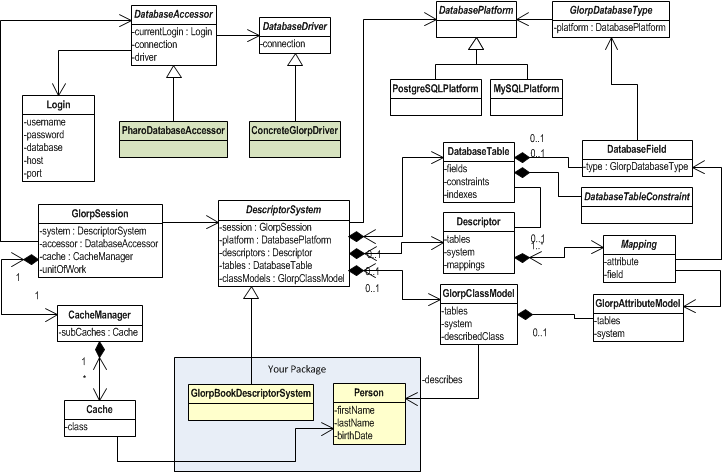
Glorp类模型图
(图表说明:展示了Glorp对象模型中最重要的类及其属性关系)
附录A:关系数据库基础概念
表
表是数据库中以结构化格式存储的相关数据集合,由字段(列)和行组成。每个表有固定数量的列,但可有任意行数。唯一标识行的列子集称为主键。
行
行(也称记录或元组)代表表中的单个结构化数据项。每行表示一组相关数据,且所有行具有相同结构。
列
例如在公司表中,每行代表一个公司,列可能代表公司名称、街道地址、是否上市公司、增值税号等。
约束
约束可进一步限制属性的值域。例如将整数值限制在1-10之间。SQL以检查约束的形式实现约束功能。
主键
主键唯一指定表中的元组。代理键是分配给对象的人工属性,用于唯一标识(如学号)。复合键由两个或多个属性组成,共同唯一标识记录。
外键
外键是关系表中的字段,匹配另一个表的主键列,可用于交叉引用表。外键不需要在引用关系中具有唯一值。
索引
索引提供更快的数据访问方式。可在关系的任何属性组合上创建索引。使用索引的查询可直接找到匹配元组,而无需逐个检查。
关系与连接
SQL连接子句通过共用值组合两个或多个表的字段。ANSI标准SQL指定五种连接类型:INNER、LEFT OUTER、RIGHT OUTER、FULL OUTER和CROSS。
内连接要求两个连接表中的每条记录都有匹配记录。
外连接即使没有匹配记录也保留所有记录,分为左外连接、右外连接和全外连接。
数据操作语言(DML)查询
SELECT
SELECT语句从一个或多个数据库表或视图中检索零行或多行。SELECT查询指定结果集但不指定如何计算,由数据库查询优化器负责寻找最佳执行计划。
INSERT
SQL INSERT语句向关系数据库中的单个表添加一条或多条记录。列数和值数必须相同。如果违反任何约束,新行不会添加到表中并返回错误。
UPDATE
SQL UPDATE语句更改表中一条或多条记录的数据。可以更新所有行,或使用条件选择子集。使用FROM子句时,应确保连接为每个要修改的行最多产生一个输出行。
DELETE
DELETE语句从表中移除一条或多条记录。匹配WHERE条件的所有行将被移除。如果省略WHERE子句,将删除表中所有行,因此需谨慎使用。
评论